Version: 1.4.1
Release date: 20-February-2023
!!! PATCHMASTER NEXT Version 1.3 (or more recent) can read data files from PATCHMASTER version 2x91 or more recent. !!!
Data created by PATCHMASTER NEXT Version 1.3 (or more recent) can also be opened by PATCHMASTER 2x91.
New Features
Installation
- Software Installer Inclusion of Visual C++ Redistributable in the installer of Patchmaster Next.
Settings
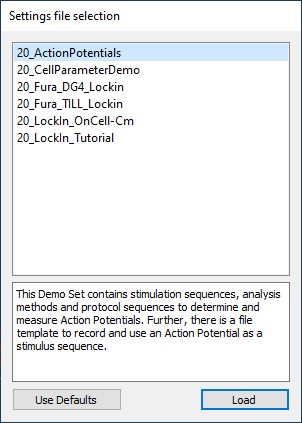
- Demo Sets Pre-installed configurations with Demo Sets for an easy application specific start of the program is now available:
- 20_ActionPotentials
- 20_CellParameterDemo
- 20_Fura_DG4_Lockin
- 20_Fura_TILL_Locking
- 20_LockIn_OnCell-Cm
- 20_LockIn_Tutorial
Batch Communication
- Interface A new Batch Communciation interface is introduced. See new syntax documentation.
Configuration
- I/O Tab Removal of the I/O tab, re-organization of hardware tab
Control window
- Event Detection window In case a FITMASTER NEXT license is detected, the new Event Detection Window for online analysis of action potentials is accessible in the Control window.
Amplifier window
- Extended Mode of C-Fast compensation Filtered and unfiltered C-Fast compensation amplitudes are now available.

Test Pulse window
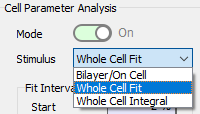
- Extended Test Pulse functionality Set and read all parameters via Macro Commands. Cell Parameter Analysis Modes:
- Bilayer/On Cell
- Whole Cell (Transient) Fit
- Whole Cell (Transient) Integral
- Noise measurement Noise measurement with editable duration and displayed sample frequency.
- Amplifier Protocols Concept Three editable protocols which can be accessed via Test Pulse window.
Analysis Editor
- Display of trace data Optional compressing of data to fit display resolution.
- Graph Layout Layout settings moved to Graph Layout windows.
I/O Control window
- Tweak options Extended Tweak options in the I/O Control window.
Data Tree
- Analysis Tree Review of Analysis Methods stored with the data (Edit/Review Mode).
Stimulus Editor
- Stimulus Generator Tree Review of Stimulus Sequences stored with the data (Edit/Review Mode)
Graph Layout
- Extended Wipe functionality Wipe Graph Layout content.
Oscilloscope
- Extended Wipe functionality:
- Wipe All
- Wipe Oscilloscope
Equation Editor
- Redesign Redesign of the Equation Editor window.
Fixed Bugs
- Technical problems to fully support Revision “H” and Revision “N” type EPC 10 USB amplifiers.
- Wrong computation of LockIn parameters (negative CM, 180° Phase shift)
- Extended C-Fast and Stimulus Range settings of the amplifier not stored in the Configuration.
- Igor export file was empty.
- Matlab export file was not readable by Matlab.
- Resetting the amplifier did not work.
- Glitch in correctly displaying the system time and timer time.
- Faulty inclusion of Photometry Extension.
- Failed Auto RS-Compensation.
- Several issues with the Zap functionality.
- Broken dialogs in the Full Test procedure.
- Program crashes:
- While Test Pulse was running.
- During data acquisition in Telegraphing mode
- When trying to re-initialize a shut-off amplifier
Limitations
- Gap-free acquisition mode not yet supported.
- Merge of stimulation files (PGF) not yet supported.
- Merge of data files not yet supported.
- DocuLUX not yet supported (PMN 1.5).
- SmartLUX not yet supported (PMN 1.5).
- Missing compatibility with M1 Mac architecture.